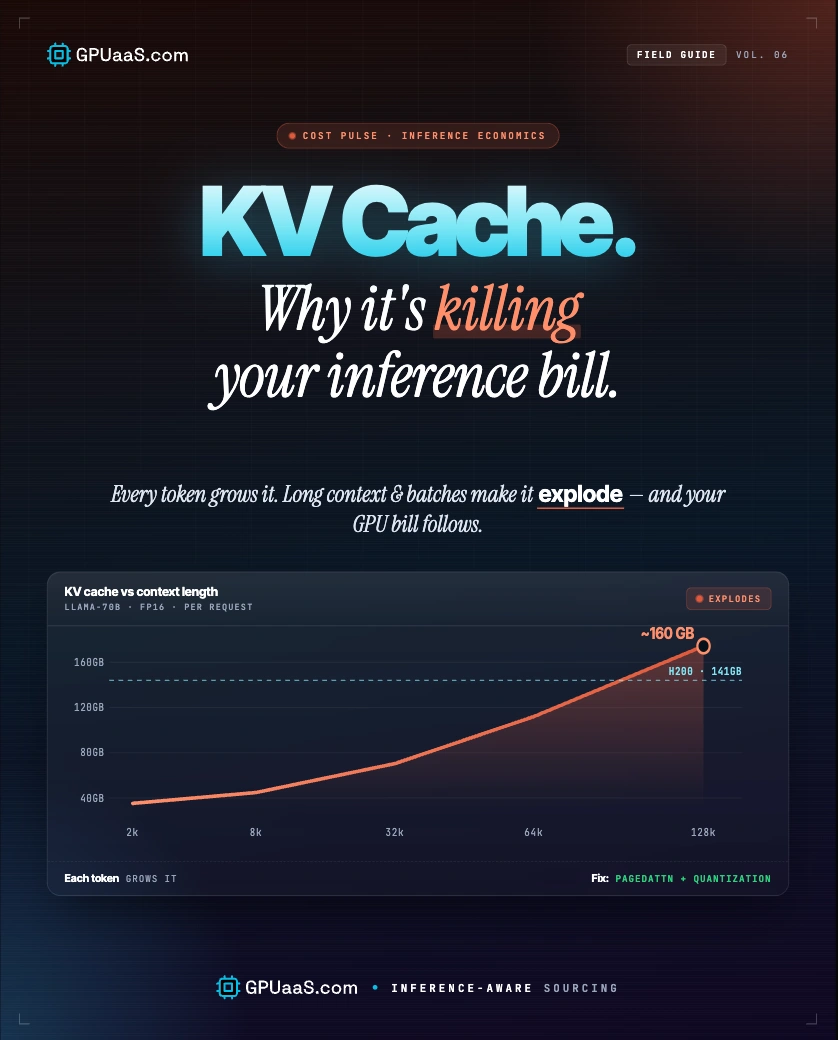
The KV cache is what makes autoregressive inference fast enough to use in production, and it's also the reason your GPU bill climbs every time you increase context length, batch size, or concurrent users. At 128K context, the KV cache for a single Llama 3 70B request hits ~42.9 GB at FP16, more than the model weights themselves.
- KV cache memory scales linearly with context length and batch size. At 128K tokens, it outweighs the model weights for Llama 3 70B at FP16
- Before PagedAttention, contiguous KV cache allocation wasted 60-80% of VRAM through fragmentation. vLLM's PagedAttention drops that waste to under 4%
- Prefix caching (SGLang RadixAttention) hits 85-95% cache reuse on few-shot workloads and delivers up to 6.4x throughput gains on prefix-heavy traffic
- FP8 KV cache quantisation cuts per-token cache memory by 50% with accuracy loss within measurement noise on most benchmarks, per the vLLM team (April 2026)
- Combining PagedAttention, prefix caching, GQA, and FP8 KV quantisation collapses long-context inference cost by 4-40x vs an unoptimised FP16 baseline
Most teams budget for model weights when they size GPU clusters. They forget the KV cache. That's where the surprise bills come from. A 70B model's weights are fixed at ~140 GB. The KV cache grows with every token you process, every user you add, and every context window you extend. Get the cache wrong and you're either OOMing in production or running at a fraction of the GPU utilisation you're paying for.
This post covers how the KV cache works, why it's expensive, and the four techniques that cut costs without touching your model. For the VRAM sizing behind all of this, see the VRAM guide. For cluster sizing, see the GPUaaS.com cluster catalogue.
Transformer models generate tokens one at a time. To produce token N, the model runs attention over every token from 1 to N-1. Without any caching, that means re-computing the attention keys and values for all previous tokens on every single step. For a 1,000-token sequence, you'd run the full attention computation 1,000 times, each one getting longer than the last.
The KV cache fixes this by storing the key (K) and value (V) tensors computed for each previous token so the model can reuse them instead of recomputing. On step N, only the new token needs fresh K and V computation. Everything before it is read from cache. That's the tradeoff: compute time for memory.
The formula for how much VRAM the cache uses: 2 x num_layers x num_kv_heads x head_dim x seq_len x batch_size x bytes_per_element. Every variable in that formula except num_layers, num_kv_heads, and head_dim is something you control at serving time.
The cost problem has two dimensions. First, cache size scales linearly with context length. Double the context, double the cache. Second, it scales linearly with batch size. Serve 16 concurrent users and you've got 16 independent caches running simultaneously.
At 128K context, a single Llama 3 70B request's KV cache (~42.9 GB) already consumes 30% of an H200's 141 GB VRAM. Add model weights (~140 GB) and you're over budget before serving a second user. At 1M context, the cache outweighs the model entirely.
The second cost driver is fragmentation. Pre-PagedAttention, every inference engine reserved a contiguous block of VRAM per request upfront. Requests finish at different times, leaving gaps that can't be filled by new requests of different sizes. Studies found 60-80% of VRAM was wasted this way on typical serving workloads.
GPUaaS.com infrastructure data: teams that move from an unoptimised FP16 KV cache baseline to PagedAttention plus FP8 quantisation see GPU utilisation jump from under 30% to above 85% on the same hardware, at the same model size and context length.
PagedAttention, introduced by the vLLM team and now shipped by every major inference engine, borrows the virtual memory paging concept from operating systems. Instead of reserving one contiguous VRAM block per request, it breaks the KV cache into fixed-size pages (typically 16 or 32 tokens) and scatters them anywhere in physical memory. The attention kernel reads through a page-table indirection.
The result: VRAM fragmentation drops from 60-80% to under 4%. That freed memory directly increases the batch sizes you can run. More requests per GPU, lower cost per token.
How to enable it
PagedAttention ships by default in vLLM, SGLang, and TensorRT-LLM. You don't need to turn it on. The only tuning decision is block size: 16 tokens works well for most workloads, 32 tokens can improve throughput on long-context serving at the cost of slightly higher memory granularity.
⚡ Watch out
Some inference benchmarks disable PagedAttention to hit single-request throughput numbers. Don't use those numbers for capacity planning. Real production workloads are multi-request and the comparison isn't valid without it.
PagedAttention fixes fragmentation within a single request. Prefix caching fixes the waste across requests. If 100 users all send the same 2,000-token system prompt, a naive engine computes fresh K and V tensors for those 2,000 tokens 100 separate times. With prefix caching, it computes them once and reuses the result for every subsequent request that shares that prefix.
SGLang's RadixAttention stores cached prefixes in a radix tree, matching new requests against all cached prefixes and serving the longest match. Cache hit rates on common workloads: 85-95% for few-shot prompting, 75-90% for multi-turn chat. On prefix-heavy traffic, SGLang delivers up to 6.4x higher throughput than vLLM's standard PagedAttention alone.
Prefix cache hit rates by workload type
⚠ When prefix caching hurts
If your workload is mostly unique prompts with no shared prefix, RadixAttention's LRU cache consumes VRAM without returning any benefit. In that case, stick with standard PagedAttention in vLLM. Prefix caching pays off when you have recurring system prompts, shared context, or multi-turn sessions.
SGLang delivers 29% higher throughput than vLLM on standard H100 benchmarks (16,200 vs 12,500 tokens/sec), and up to 6.4x higher throughput on prefix-heavy traffic via RadixAttention, per Morph LLM inference benchmarks (April 2026).
The previous two fixes are serving-layer optimisations. GQA (Grouped Query Attention) and MLA (Multi-head Latent Attention) reduce KV cache size at the model architecture level. They ship baked in, so you don't configure them -- you just pick models that use them.
GQA (Grouped Query Attention)
Multiple query heads share a single set of K and V heads, shrinking the KV cache in proportion to the group size. Llama 3 uses GQA across all sizes (8B and 70B). Mistral used it from its first 7B release. Now the baseline expectation for any new open-weight model.
MLA (Multi-head Latent Attention)
DeepSeek's architecture, used in DeepSeek-V2, V3, and R1. Projects K and V into a compressed latent space before caching. Achieves 93.3% KV cache reduction vs standard multi-head attention. That's why DeepSeek providers can quote lower per-token rates at the same context length as Llama-based providers.
Practical implication
If you're choosing between a Llama 3 70B deployment and a DeepSeek-V3 deployment for a long-context use case on GPUaaS.com H200 clusters, MLA is a significant factor in the cost comparison, not just model accuracy. DeepSeek's KV cache is 5-10x smaller at the same context length.
KV cache quantisation stores the cached K and V tensors at lower precision than the model's compute precision. FP16 is the typical baseline. Dropping to FP8 or INT8 cuts cache memory in half. Dropping to INT4 cuts it by 75%.
| Format | Memory vs FP16 | Accuracy impact | How to enable (vLLM) |
|---|---|---|---|
| FP8 | 50% reduction | Within measurement noise on most benchmarks | --kv-cache-dtype fp8 |
| INT8 | 50% reduction | Slightly larger gap; depends on calibration | --kv-cache-dtype int8 |
| INT4 (TurboQuant) | 75% reduction | ~7-8% end-to-end overhead (LMDeploy) | LMDeploy with TurboQuant |
FP8 KV cache is the right default for most production deployments on H100 or H200 hardware. The vLLM team's April 2026 benchmarks show per-token cache memory drops to 54% of the BF16 baseline in the best cases, with accuracy on long-context needle-in-haystack tasks recovering to 89% vs 91% at BF16 when using the two-level accumulation strategy.
⚠ Watch out
FP8 KV cache quantisation and FP8 model weight quantisation are two separate things. You can run a BF16 model with an FP8 KV cache, or an FP8 model with an FP16 KV cache. They're independent flags. Most teams want both enabled in production.
Llama 3.1 70B on H100 SXM5 costs roughly $0.71 per million tokens on-demand at FP8 vs $1.19/M at BF16, a 40% cost reduction on the same hardware, per Spheron FP8 inference benchmarks (May 2026).
Last reviewed: May 27, 2026. For a full GPU comparison by VRAM capacity, see the VRAM guide. To get a cluster quote, see how GPUaaS.com works. For GPU clusters sized for long-context inference, visit the GPUaaS.com cluster catalogue.